Choosing server memory is rarely as simple as comparing capacity and price. RDIMM and LRDIMM may look similar on a specification sheet, yet they behave differently inside a memory channel. Understanding the RDIMM vs LRDIMM difference can prevent costly compatibility problems, disappointing upgrade results, and unnecessary performance assumptions.
This guide examines five practical differences, including buffering design, electrical loading, maximum supported capacity, latency, and platform compatibility. RDIMMs place registers between the memory controller and memory chips, helping stabilize signals across populated slots. LRDIMMs use additional buffering to reduce the electrical load seen by the processor. That design can support denser configurations, but it may introduce different latency, power, and firmware considerations.
The choice matters.
In real server deployments, the best option depends on the processor generation, motherboard validation list, workload, and required memory density. A database server with many active virtual machines may benefit from higher-capacity LRDIMMs. A smaller application host may gain better value from RDIMMs. However, capacity claims should be checked carefully. Memory support varies by platform, rank structure, BIOS version, and the number of installed modules.
Numbers can mislead.
This comparison uses established server-memory principles and practical installation considerations rather than relying only on marketing language. It also recognizes an important limitation: no single module type is universally better. Some recommendations may change as hardware generations evolve, and a simplified rule can fail in unusual configurations. Checking the manufacturer’s documentation remains essential before purchasing or mixing modules.
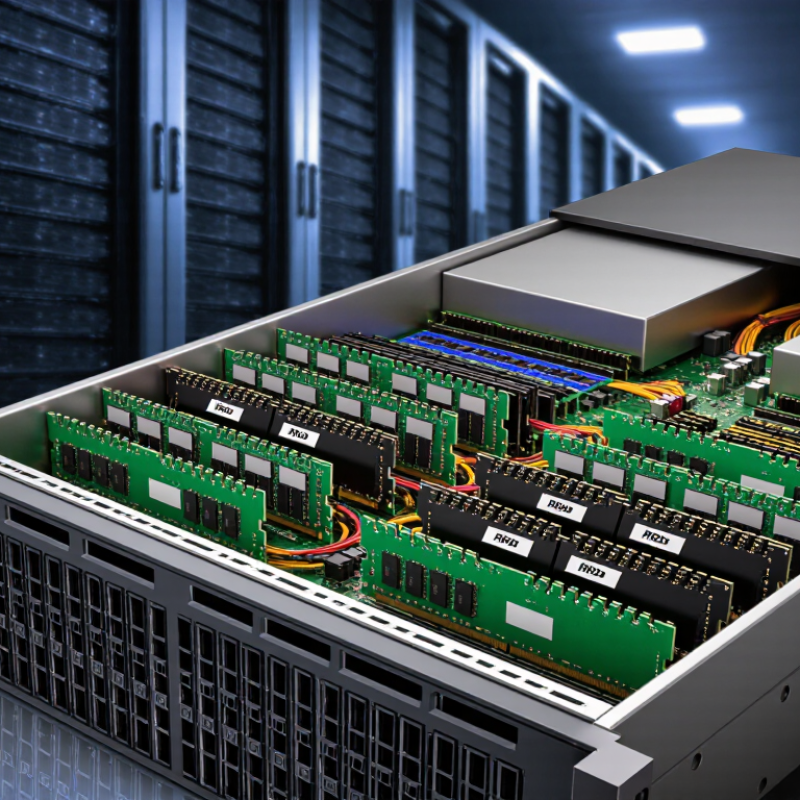
RDIMM and LRDIMM are server memory modules built around registered buffering. An RDIMM places a register between the memory controller and the module’s address and command signals. This reduces electrical stress and supports stable operation with multiple modules installed. LRDIMM adds another buffer layer for data signals, lowering the electrical load seen by the memory controller. That design can support greater memory capacity in suitable servers.
DDR5-4800 describes a data rate of 4,800 MT/s, not a 4,800 MHz clock speed. Both RDIMM and LRDIMM may operate at DDR5-4800, but the actual rate depends on the processor, motherboard, firmware, and module population. Always check the platform’s memory rules. A mixed installation can force lower speeds or fail to boot.
RDIMM usually offers lower latency, simpler validation, and better value for ordinary virtualization or database workloads. LRDIMM is more useful when a system needs very high capacity, such as many large memory modules. Its extra buffering may increase cost and can affect latency slightly. Capacity wins here.
From practical system planning, compatibility matters more than the label alone. Check rank limits, supported module types, voltage, and maximum capacity per slot. I once treated the data rate as the main decision point; that was incomplete. Memory architecture and workload behavior deserve equal attention.
RDIMM and LRDIMM differ most when memory capacity becomes a serious constraint. RDIMM usually suits balanced servers with moderate memory needs. LRDIMM uses memory buffers to reduce the electrical load on the processor’s memory controller. This design supports higher-density modules, often scaling beyond 256GB per module on compatible platforms.
That number is not universal. The processor generation, motherboard, firmware, memory channels, and module technology all matter. A server may accept a 512GB LRDIMM, yet fail to reach its rated capacity after mixing modules or lowering memory speed. LRDIMM can also add cost, power consumption, and slight latency. More capacity is not automatically better. Sometimes a smaller RDIMM configuration performs more predictably.
Tips:
When comparing RDIMM and LRDIMM, start with measurable memory behavior, not module labels. A DDR5-5600 channel offers about 44.8 GB/s of theoretical bandwidth. Real systems deliver less. Firmware settings, channel loading, and workload patterns all matter.
LRDIMM does not automatically provide more bandwidth. At the same DDR5-5600 speed, its headline throughput can match RDIMM. Its advantage appears when servers need very large capacities or many populated slots. Load-reduction circuitry eases the electrical burden on the memory controller. That can protect signal quality, but it may add buffering stages and slightly increase access latency.
Latency is easier to feel in small, random transactions. Database lookups, virtual-machine activity, and irregular analytics may respond better to lower-latency RDIMM configurations. Streaming workloads, such as large sequential scans, often benefit more from sustained bandwidth. Measure both. Use memory bandwidth tests, loaded latency tests, and the actual application.
Numbers can mislead.
A lightly populated LRDIMM system may perform close to RDIMM. A heavily populated RDIMM system may lose stability or require slower settings. That comparison is not perfectly fair. Check identical timings, channel counts, capacity, and operating temperatures. I would also repeat tests after several hours of load. Short benchmarks sometimes flatter the faster module. The practical winner depends on whether capacity, bandwidth, or latency limits the server first.
Choosing between RDIMM and LRDIMM starts with platform compatibility, not capacity. The processor must support the memory type through its integrated memory controller. A server board may physically accept both module types, yet its firmware or CPU rules can reject one. RDIMM and LRDIMM should not be mixed in the same system. Check the processor specification, board qualified-memory list, and firmware notes together. Treat physical fit as a weak signal. It proves little.
DIMM slot count also matters. A four-channel system usually needs balanced population across all channels for predictable bandwidth. Install matching modules in the paired slots shown by the board manual. Do not fill one channel completely while leaving another empty unless the platform explicitly permits it. Some systems reduce memory speed when more slots, ranks, or higher-capacity modules are installed. That behavior is normal, but it can surprise buyers. Measure the real workload.
Channel population rules vary by CPU generation and board layout. Confirm supported capacity per slot, channel, and processor, then check whether dual- or single-processor operation changes the memory map. LRDIMM can enable greater capacity, but only when the controller and board validate it. RDIMM may be safer for moderate capacity and simpler deployment. A careful installer records slot labels, module rank, speed, and voltage before powering on. I still verify every assumption against the manual; memory compatibility is where confident guesses become expensive.
5 Best RDIMM vs LRDIMM Differences Explained?
Capacity per rack changes the decision between RDIMM and LRDIMM. RDIMM usually costs less and consumes less power per module. It fits many virtualization, database, and analytics servers well. LRDIMM uses additional buffering to reduce electrical load on memory channels. This design supports higher-capacity modules and more memory per server.
Consider a two-socket server with 16 memory slots. Using 128GB RDIMMs could provide about 2TB of memory. Using 256GB LRDIMMs could raise capacity to roughly 4TB. Across a 42U rack, that difference may reduce server count substantially. Fewer servers can lower networking, licensing, cooling, and maintenance costs. The calculation is not universal.
Rack power deserves equal attention. A high-density LRDIMM configuration may draw more memory power, even when it replaces several servers. Facility teams should measure total rack watts, airflow, and cooling headroom. A simple module comparison can mislead. I have seen capacity plans fail because power limits were checked after procurement. That mistake is expensive.
RDIMM remains practical when memory demand is moderate and budget pressure is strong. LRDIMM becomes more compelling when each server must hold large datasets or support many virtual machines. Check processor support, slot population rules, memory speed, and warranty requirements before ordering. Real workloads matter more than theoretical capacity. A spreadsheet helps. Testing helps more.
| Evaluation Dimension | RDIMM | LRDIMM | Practical Data-Center Impact |
|---|---|---|---|
| 1. Memory Architecture | Uses a register to buffer command and address signals. Data signals still connect directly between the memory controller and the DRAM devices. | Uses a memory buffer that isolates both command/address signals and data signals from the memory controller. |
RDIMM: Lower design complexity and generally lower module cost. LRDIMM: Better electrical isolation for very high-capacity configurations. |
| 2. Maximum Capacity Potential | Commonly available in capacities from 16 GB to 128 GB per module in current server platforms. Actual limits depend on the processor generation, memory speed, and motherboard. | Commonly available in capacities from 64 GB to 256 GB per module in current server platforms. Some platforms support higher capacities, subject to validation. | LRDIMM can provide substantially more memory in the same number of slots, making it suitable for virtualization, in-memory databases, and large analytics workloads. |
| 3. Cost per Gigabyte | Usually has the lower purchase price per gigabyte because the module design is less complex and demand is broader. | Usually carries a higher purchase price per gigabyte because of the additional memory-buffer components and narrower market volume. | RDIMM is normally the better value when the required capacity fits within the server’s slot and channel limits. LRDIMM may reduce the cost of adding servers when memory capacity is the main constraint. |
| 4. Power and Cooling | A representative planning range is approximately 3–5 W per module under sustained server workloads, depending on density, speed, voltage, and workload. | A representative planning range is approximately 4–7 W per module under sustained server workloads because the buffer adds active components. | LRDIMM generally consumes more power per populated module. However, its higher capacity can reduce the number of servers required, potentially lowering total rack power when memory is the limiting resource. |
| 5. Capacity per Rack | Example: a 42U rack with forty-two 1U, two-socket servers and sixteen 128 GB modules per server provides approximately 84 TB of raw installed memory. | Example: the same rack populated with sixteen 256 GB modules per server provides approximately 168 TB of raw installed memory. | The illustrative LRDIMM configuration doubles raw memory capacity without increasing the number of servers. Real rack capacity is limited by server validation, power delivery, cooling, networking, storage, and usable-memory overhead. |
| Planning note: RDIMM and LRDIMM are generally not mixable in the same server. Confirm the processor, motherboard, supported rank configuration, maximum DIMM capacity, memory speed, and vendor qualification list before procurement. The capacity and power figures above are representative planning ranges rather than quotations or guaranteed specifications. | |||
No. Use one memory type throughout the system. Physical fit does not prove compatibility.
Check the processor specification, motherboard memory list, and firmware notes. Confirm supported capacity, speed, voltage, and module rank.
Follow the paired slot labels in the system manual. Balance modules across all memory channels for predictable bandwidth.
Yes. Extra slots, higher ranks, or larger modules may lower supported speed. This behavior can be normal.
It can. Single-processor and dual-processor systems may use different memory maps. Verify the rules for each configuration.
RDIMM often suits moderate memory needs and tighter budgets. It commonly supports virtualization, databases, and analytics workloads.
LRDIMM may help when one server needs very large memory capacity. It can support larger modules and reduce electrical load on memory channels.
Sometimes. For example, 256GB modules may provide about 4TB in a 16-slot server. Fewer servers can reduce cooling, networking, and maintenance costs.
No. Dense memory may draw more power per server. Measure rack watts, airflow, and cooling capacity before ordering.
Record each slot, rank, speed, and voltage before installation. Test the real workload, not only the theoretical capacity. I still recheck every assumption.
Understanding the RDIMM vs LRDIMM difference is essential when planning modern server memory. RDIMMs use registered buffers to reduce the electrical load on the memory controller, making them suitable for stable, balanced configurations and data rates such as DDR5-4800. LRDIMMs go further by using load-reducing technology, allowing systems to support higher memory densities and scale beyond 256GB per module in compatible platforms. This makes them attractive for virtualization, analytics, and other memory-intensive workloads.
The choice also depends on performance, compatibility, cost, and power. While DDR5-5600 configurations may offer strong bandwidth, LRDIMMs can introduce additional latency, so workload behavior should be considered carefully. Buyers must verify CPU support, DIMM slot limits, channel population rules, and motherboard requirements before installation. Finally, LRDIMMs may deliver greater capacity per rack, potentially reducing server count, but their higher purchase cost and power demand should be compared with the overall data center budget and efficiency goals.

Corexis Memory